Wanted to see how much a bandwidth used between a specific timestamp? Curious about the size of a YouTube video or a System update? If you are the only one using your home router you can get an overall estimate of bandwidth usage using this quick script.
Notes
Needs a web server and PHP and you must have already configured your router for networkinfo.sh file. More info here>
Just create two php files and use index.php
<?php
$startTime = array_sum(explode(' ', microtime()));
header("Cache-Control: no-store, must-revalidate");
?>
<!DOCTYPE html>
<html lang="en">
<head>
<title>Data Calculator</title>
<meta name="viewport" content="user-scalable=yes, initial-scale=1, width=device-width">
<link rel="icon" href="data:;base64,iVBORw0KGgo=">
<link rel="stylesheet" type="text/css" href="/lib/css/dashboard-header.css">
<style>
/* Checkbox */
.box-inpt {
	position: absolute;
	width: 100px;
	height: 2em;
}
.autosave-checkbox {
	position: relative;
	width: 100%;
	height: 100%;
	top: 0;
	left: 0;
	display: block;
	opacity: 0;
	z-index: 1;
}
.autosave-checkbox:checked + .box-span-inpt .span-input {
	transform: translateX(80px);
}
.box-span-inpt {
	position: absolute;
	top: 0;
	left: 5px;
	width: 100%;
	height: 100%;
	border: 2px solid black;
	border-radius: 5px;
	overflow: hidden;
}
.span-input {
	position: absolute;
	top: 0;
	left: 0;
	width: 20px;
	height: 2em;
	background-color: black;
	transition: 0.3s;
}
.span-input::before, .span-input::after {
	position: absolute;
	top: 0;
	text-align: center;
	line-height: 2em;
	width: 80px;
	height: 100%;
	font-size: 1em;
	color: #ffffff;
	font-family: sans-serif;
}
.span-input::before {
	content: "ON";
	left: -80px;
	background-color: #00da00;
}
.span-input::after {
	content: "OFF";
	right: -80px;
	background-color: #ff002f;
}
</style>
</head>
<body>
<div class="header">
<span class="headerlogo">Current Data Calculator</span>
<input class="menu-btn" type="checkbox" id="menu-btn" />
<label class="menu-icon" for="menu-btn"><span class="navicon"></span></label>
<ul class="menu">
<li><a href="/">Home</a></li>
</ul>
</div>
<div class="content">
<div class="card">
<div class="primary-title">
<div class="primary-text">Bandwidth Monitoring</div>
</div>
<div class="supporting-text" style="font-size: 14px; line-height: 14px;">
<span style="line-height: 2.5em;"></span><span class="box-inpt"><input id="subscribeCheckbox" class="autosave-checkbox" type="checkbox" data-id="buzzer"><span class="box-span-inpt"><span class="span-input"></span></span></span>
<br><br><br>
<span class="totaldata"></span><br>
<span class="rxdata"></span><br>
<span class="txdata"></span>
</div>
<hr>
<div class="actions">
<div class="cardfooter"></div>
<div class="cardfooter float-right"><button id="clear-storage-btn">Clear All Data</button></div>
</div>
</div>

<div class="card">
<div class="primary-title">
<div class="primary-text">Probe router</div>
</div>
<div class="supporting-text" style="font-size: 14px; line-height: 14px;">
<button id="loadDataBtn">Probe router</button>
<div id="contentDisplay">Content will appear here...</div>
</div>
<hr>
<div class="actions">
<div class="cardfooter"></div>
<div class="cardfooter float-right"></div>
</div>
</div>
</div>
<script>
localStorage.clear();
document.getElementById("subscribeCheckbox").checked = false;
document.querySelector('.totaldata').innerHTML = "";
document.querySelector('.rxdata').innerHTML = "";
document.querySelector('.txdata').innerHTML = "";

// 1. Select the button and container elements
const button = document.getElementById('loadDataBtn');
const display = document.getElementById('contentDisplay');

// 2. Add the click event listener to the button
button.addEventListener('click', () => {
	// 3. Initiate the asynchronous network request
	fetch('router.php')
	.then(response => {
		if (!response.ok) {
			throw new Error('Network response failure');
		}
		return response.json(); // Or response.text() if plaintext
	})
	.then(data => {
		// 4. Update the DOM with the received data
		display.innerText = JSON.stringify(data);
	})
	.catch(error => {
		console.error('Error fetching data:', error);
		display.innerText = 'Failed to load data.';
	});
});

const checkbox = document.getElementById('subscribeCheckbox');

checkbox.addEventListener('change', (event) => {
    if (event.target.checked) {
	fetch('router.php')
	.then(response => {
		if (!response.ok) {
			throw new Error('Network response failure');
		}
		return response.json(); // Or response.text() if plaintext
	})
	.then(data => {
		// 4. Update the DOM with the received data
		localStorage.setItem('rxStart', data.rx);
		localStorage.setItem('txStart', data.tx);
		let rxStart = data.rx;
		let txStart = data.tx;
	})
	.catch(error => {
		console.error('Error fetching data:', error);
		display.innerText = 'Failed to load data.';
	});
    } else {
	fetch('router.php')
	.then(response => {
		if (!response.ok) {
			throw new Error('Network response failure');
		}
		return response.json(); // Or response.text() if plaintext
	})
	.then(data => {
		// 4. Update the DOM with the received data
		localStorage.setItem('rxStop', data.rx);
		localStorage.setItem('txStop', data.tx);
		rxStart = localStorage.getItem('rxStart');
		txStart = localStorage.getItem('txStart');
		let rxStop = localStorage.getItem('rxStop');
		let txStop = localStorage.getItem('txStop');
		let totalRx = rxStop - rxStart;
		let totalTx = txStop - txStart;
		let totalCombined = totalRx + totalTx;
		totalCombined = fileSizeSI(totalCombined);
		document.querySelector('.totaldata').innerHTML = "Total Data: <b>"+totalCombined+"</b>";
		totalRx = fileSizeSI(totalRx);
		document.querySelector('.rxdata').innerHTML = "Rx: <b>"+totalRx+"</b>";
		totalTx = fileSizeSI(totalTx);
		document.querySelector('.txdata').innerHTML = "Tx: <b>"+totalTx+"</b>";
	})
	.catch(error => {
		console.error('Error fetching data:', error);
	});
    }
});

// 1. Select the button element
const clearBtn = document.getElementById('clear-storage-btn');
// 2. Add a click event listener
clearBtn.addEventListener('click', () => {
// 3. Clear all localStorage for the current domain
localStorage.clear();
document.getElementById("subscribeCheckbox").checked = false;
document.querySelector('.totaldata').innerHTML = "";
document.querySelector('.rxdata').innerHTML = "";
document.querySelector('.txdata').innerHTML = "";
// 4. (Optional) Refresh the page or update the UI to reflect changes
//location.reload();
});

function fileSizeSI(bytes) {
	const exponent = Math.floor(Math.log(bytes) / Math.log(1000.0));
	const decimal = (bytes / Math.pow(1000.0, exponent)).toFixed(exponent ? 2 : 0);
		if (bytes <= 0) {
		return "0 Bytes";
	}
	return `${decimal} ${exponent ? `${'kMGTPEZY'[exponent - 1]}B` : 'B'}`;
}
var number_of_elements = document.getElementsByClassName('siunits').length;
var i=0;
while (i<number_of_elements) {
var sivalue = document.getElementsByClassName("siunits")[i].innerText;
sivalue = fileSizeSI(sivalue);
document.getElementsByClassName('siunits')[i].textContent = "("+sivalue+")";
i++;
}
</script>
</body>
</html>
Router.php file, change the IP address of your router.
<?php
// Set headers to return JSON response
header('Content-Type: application/json');
$url = 'http://192.168.1.1/cgi-bin/networkinfo.sh';

$json_data = file_get_contents($url, 0, stream_context_create(["http"=>["timeout"=>15]]));
$data_array = json_decode($json_data, true);
if ($data_array === null && json_last_error() !== JSON_ERROR_NONE) {
	echo "Error decoding JSON: " . json_last_error_msg();
	$response = ["rx" => "No data", "tx" => "No data"];
	exit;
} else {
	$rx = $data_array['rx_bytes'];
	$tx = $data_array['tx_bytes'];
	$response = ["rx" => $rx, "tx" => $tx];
}
echo json_encode($response);
?>
Screenshot
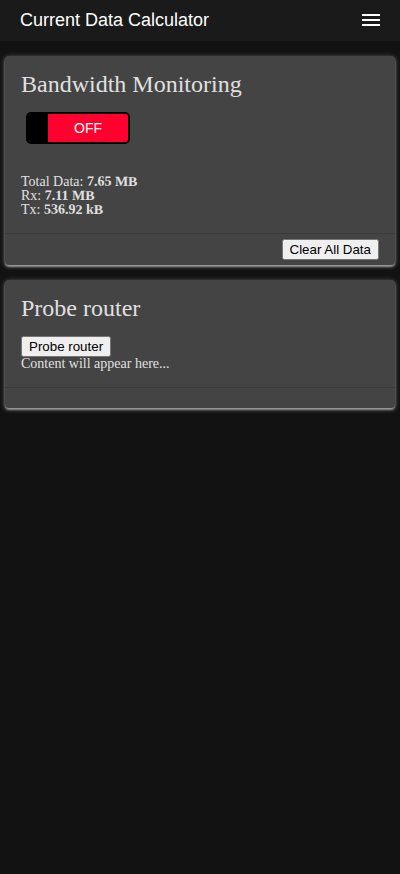
Let me know if you have any comments or if there is any error in this guide.
## Disclaimer
The software provided in this repository is for educational and informational purposes only. Under no circumstances shall the author or contributors be liable for any direct, indirect, incidental, special, exemplary, or consequential damages arising out of the use or inability to use this software. The author will not be liable for any special, incidental, consequential or indirect damages due to loss of data or any other reason.